
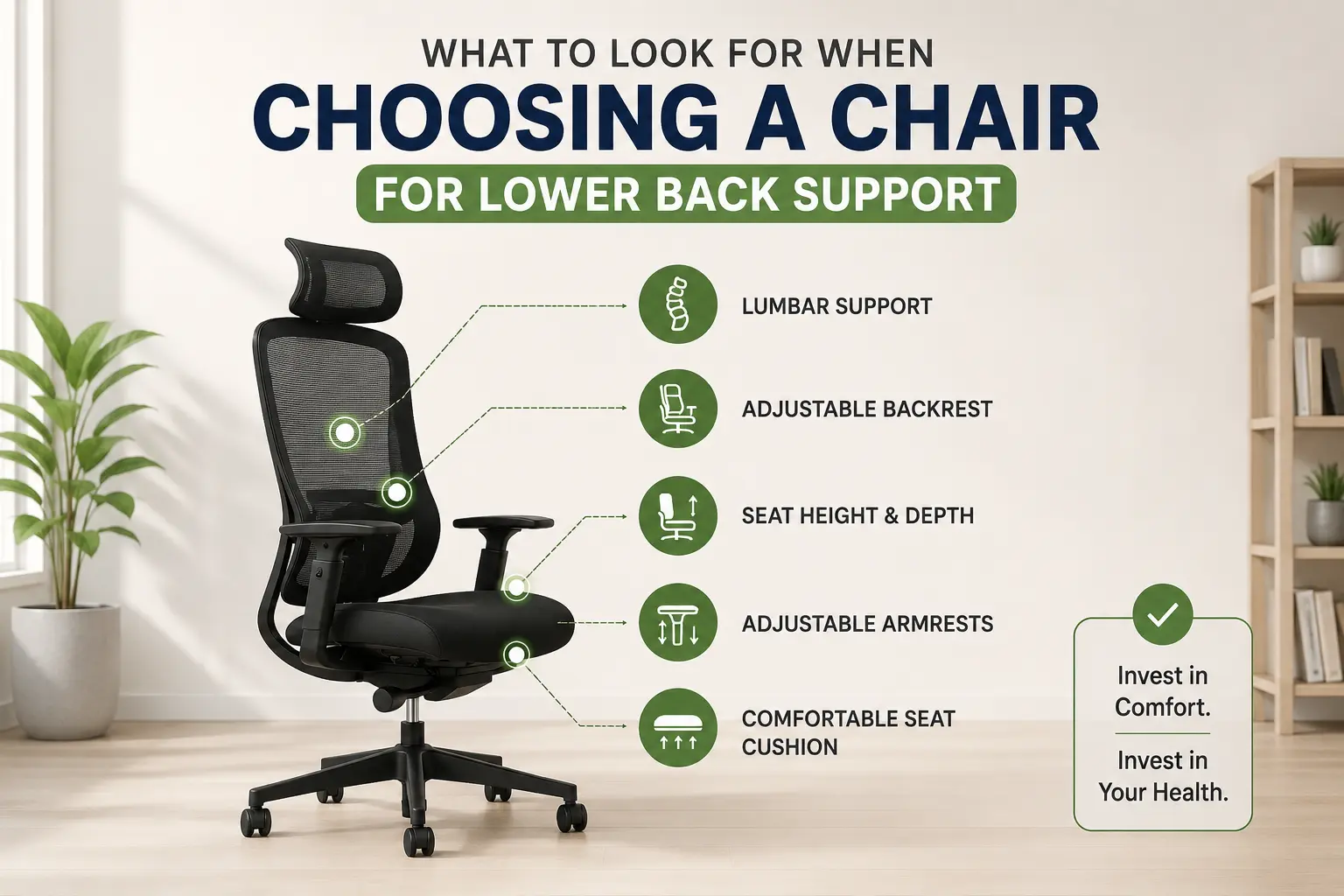
If your lower back tightens through the afternoon or you stand up from your desk feeling stiff, your chair is the first place to look. It is also where most people look last. Lower back discomfort from prolonged sitting is one of the most widely reported workplace complaints, and in most cases it has a direct and fixable cause: a chair that cannot support the lower back properly across a full working day.
Back pain is one of the leading causes of workplace absence and lost productivity. According to the International Association for the Study of Pain, more than one in four working adults report current back pain, with desk-based workers among the most affected groups. The chair is a primary contributing factor when it cannot keep the spine in a supported position across the hours most people spend sitting.
This guide explains what features genuinely make a difference to lower back support, what to look for when comparing chairs, and the mistakes most buyers make before they have sat in the chair long enough to regret them.
Why the Lower Back Struggles When You Sit for Long Periods
The lower back has a natural inward curve – the lumbar lordosis, that it holds effortlessly when you stand. When you sit down without support, that curve tends to flatten. The pelvis tilts backward, the lower back rounds outward, and the muscles surrounding the spine take on the continuous low-grade work of holding your posture together.
Over an hour, that is manageable. Across a full working day, repeated daily, it accumulates into the kind of fatigue and tightness that most desk workers accept as an unavoidable part of their routine. It is not unavoidable. It is the predictable result of sitting in a chair that allows the lumbar curve to collapse rather than one designed to support it.
A chair built for lower back support addresses this at the source. It holds the lumbar curve passively, without any conscious effort from the person sitting in it, so the surrounding muscles can relax rather than brace. That is the entire job of lumbar support, and it only happens when the support is positioned correctly and makes genuine contact with the lower back.
The Features That Actually Make a Difference
The word ergonomic appears on chairs across a wide range of price points and says nothing reliable about what the chair can actually do for your lower back. What matters is the specification. These are the features that have a real effect on lower back support during sustained sitting.
Adjustable lumbar support (depth and height)
This is the most important single feature for lower back support. The lumbar support must be able to move vertically so it aligns with your lower back at your seated height. It must also push toward the spine, depth adjustment, so it makes actual contact with the curve of your lower back rather than sitting passively against the flat backrest behind you.
A lumbar pad that only slides up and down is only half a solution. Without depth control, contact depends entirely on how close you happen to sit to the backrest in any given moment, which changes throughout the day. Both adjustments matter, and both need to be independently controllable.
Independence from the backrest
On many chairs, the lumbar support is built directly into the backrest frame. When you recline, the backrest moves away from the lower back and the lumbar pad moves with it. The moment you shift your posture, which is the moment the support matters most, it stops working. A floating or independently mounted lumbar system stays in contact through the recline range. A peer-reviewed study published on PubMed found that lumbar support combined with correct seat pan positioning produced the most neutral spinal and pelvic posture of all chair configurations tested. The key condition in the study was that the support was actually in contact with the lower back.
Seat depth slide
If the seat is too deep for your leg length, you will naturally slide forward to relieve pressure behind the knees, which means you lose contact with the backrest and lumbar support entirely. A seat depth slide allows the effective length of the seat pan to be shortened or extended to fit your proportions. It is one of the most underrated features in ergonomic seating and directly determines whether the lumbar support can do its job.
Back tilt with tension control
Holding a single fixed posture for hours places more static load on the lower back than natural movement does. A back tilt with resistance adjustable to your body weight allows you to shift between a working upright position and a gentle recline without fighting the chair. That variation reduces the accumulation of fatigue in the lower back muscles over a long day.
Seat height range
If the seat height cannot be set so your feet rest flat on the floor with knees at roughly a right angle, the pelvis tilts in a way that directly affects lumbar alignment. This is the foundational adjustment that everything else depends on. Check the minimum and maximum range against your actual height before buying, it is the most skipped step in chair selection and one of the most consequential.
Quick Reference: What to Check Before You Buy
Use this table when comparing any chair marketed for lower back support. If a chair cannot answer yes to the first five rows, it is missing a feature that has a direct effect on how your back feels after a full day. Employers in the UK and Ireland also have a legal duty to provide seating that supports the lower back in its natural position for regular desk workers, see HSE DSE guidance for the full requirements.
| Feature | Why It Matters | What to Check |
| Adjustable lumbar support | Maintains the natural lower back curve without muscular effort | Can it move vertically and push toward the spine? Both adjustments matter. |
| Seat depth slide | Allows proper thigh support without pressure behind the knees | Can the seat pan be shortened or extended to suit your leg length? |
| Back tilt with tension control | Supports natural postural movement throughout the working day | Does resistance adjust to your body weight or is it fixed at one setting? |
| Seat height gas-lift range | Ensures feet rest flat on the floor at the correct knee angle | Does the range cover your actual height? Check the minimum setting first. |
| 3D or 4D adjustable armrests | Reduces load on the neck and shoulders during extended use | Do they adjust in height, depth, width, and pivot — not just up and down? |
| BS 5459 or UKAC-5459 certification | Confirms independent testing for continuous daily use at a declared weight | Is it listed in the specification, or just implied by the word ergonomic? |
| 10-year warranty | Reflects build quality and the expected lifespan of a primary desk chair | Is it backed by stocked UK supply and a domestic support network? |
Source: Workhappy UK: Will Your Chair Fit You? Four Simple Measurements
Mistakes Most People Make When Choosing a Chair for Lower Back Support
These come up repeatedly and are worth knowing before you buy rather than after sitting in the wrong chair for six months.
- Assuming ‘ergonomic’ means adjustable lumbar support: The term is used on chairs across a very wide range. Always check whether the lumbar support can be repositioned vertically and pushed toward the spine. If neither is confirmed in the specification, it is a fixed pad.
- Choosing based on the photograph: A prominent lumbar pad looks supportive. A high backrest looks like full coverage. Neither tells you whether those features adjust to your specific body. The specification is the product, the image is the marketing.
- Not checking seat height range first: A chair with the wrong height range cannot be corrected by any other adjustment. It is the first measurement to verify and the one most buyers skip entirely.
- Overlooking seat depth: A seat that is too deep for your leg length makes it physically impossible to use the lumbar support consistently. Seat depth adjustment is not a luxury feature, for shorter users especially, it is essential.
- Treating price as a quality indicator: A mid-range chair with genuine lumbar depth adjustment and independent certification will outperform an expensive chair with a fixed pad. The specification sheet tells you what the chair actually does. The price does not.
Choosing the Right Chair Type for Your Build and Environment
The features above apply across the ergonomic task chair category. The right specific model depends on your height, your working environment, and how long you sit.
For taller users who need full spine coverage from the lumbar region up to the upper shoulders, a task chair with a high back profile provides that range without compromise. For shorter users or more compact environments, a task chair with a low back profile can position lumbar contact more accurately at a lower seated height, a tall backrest on a smaller frame often positions the lumbar support too high to be effective.
The right backrest height is the one that aligns the lumbar area of the chair with your natural lower back curve, not necessarily the tallest or most visually imposing option available. JH Chairs offers ergonomic task chairs in both high-back and low-back configurations, featuring adjustable lumbar support, a standard warranty, and next-day dispatch from UK stock to businesses and home offices across the UK and Ireland.
Key Takeaways
- Lower back discomfort from sitting is a direct result of a chair that cannot support the lumbar curve passively across a working day, it is not an inevitable part of desk work
- Adjustable lumbar support with both vertical and depth control is the single most important feature, a pad that cannot push toward the spine provides inconsistent contact at best
- A lumbar system that moves independently of the backrest stays in contact when you shift or recline, fixed and rail-mounted systems do not
- Seat depth slide and seat height range are foundational, without both being correct, the lumbar support cannot do its job regardless of its quality
- Employers have a legal duty to provide supportive seating for regular desk workers, the HSE DSE Regulations 1992 set the minimum standard in the UK, with equivalent duties in Ireland under the Safety, Health and Welfare at Work Regulations 2007
- BS 5459 or UKAC-5459 certification confirms independent testing for continuous daily use, it is the benchmark to look for on any primary desk chair
Frequently Asked Questions
What chair features matter most for lower back support?
Adjustable lumbar support with both vertical and depth control is the most critical. Pair that with a seat depth slide so you can sit fully back in the chair without losing contact with the backrest, and a back tilt with tension control to allow natural postural movement through the day. These three features together address the main structural reasons a chair fails to support the lower back during sustained sitting.
What is the difference between adjustable lumbar support and a fixed lumbar pad?
A fixed lumbar pad is moulded into the backrest at a set position. It cannot be moved to match your lower back height or pushed toward your spine. Adjustable lumbar support moves vertically to align with your individual seated height, and on properly specified chairs it also adjusts in depth so the support makes genuine contact with the lumbar curve rather than sitting a few centimetres behind it.
How do I know if my chair is causing my lower back discomfort?
The clearest sign is a pattern that improves over time away from your desk, weekends, holidays, or time working away from your usual setup, and returns after a day back in the chair. If you are shifting constantly to find a comfortable position, or if you stand up stiff and take several minutes to straighten out, the chair is very likely a contributing cause. Start by checking whether the lumbar support is in the right position and making actual contact with your lower back when you sit fully back in the seat.
Is a chair with a high back always better for lower back support?
Not necessarily. A high backrest provides full spine coverage from the lumbar region to the upper shoulders, which suits taller users well. For shorter users, a tall backrest can position the lumbar area of the chair above the actual lower back curve, making the lumbar support ineffective. The right backrest height is the one that aligns the lumbar section of the chair with your lower back, which for shorter users is often a low or mid-back task chair.
What does BS 5459 certification mean on an office chair?
BS 5459 is the British Standard for seating used by office workers. It confirms independent testing for continuous use at a declared weight capacity in an office environment. A chair carrying this certification has been assessed against the requirements for a primary desk seat used daily. UKAC-5459 is the equivalent framework for higher weight ratings. Either confirms the chair has been tested for the kind of sustained use that a lumbar support chair actually needs to hold up to.
Conclusion
Choosing a chair for lower back support comes down to whether the chair can maintain your lumbar curve without you having to think about it. The features that make that possible are consistent: independently adjustable lumbar support, a seat depth that suits your leg length, a tilt mechanism that allows natural movement, and a seat height range that covers you. When a chair has all of these and has been independently certified for continuous use, it is the right tool for the job.
If you are ready to find a chair built around these specifications, explore the JH Chairs range, high and low back ergonomic task chairs available from UK stock, with a standard warranty and next-day dispatch.